
 MENU
MENU


NOTE!
Click on MENU to Browse between Subjects...17CS553 - ADVANCED JAVA AND J2EE
Answer Script for Module 4
Solved Previous Year Question Paper
CBCS SCHEME
ADVANCED JAVA AND J2EE
[As per Choice Based Credit System (CBCS) scheme]
(Effective from the academic year 2019 -2020)
SEMESTER - V
Subject Code 17CS553
IA Marks 40
Number of Lecture Hours/Week 03
Exam Marks 60
These Questions are being framed for helping the students in the "FINAL Exams" Only
(Remember for Internals the Question Paper is set by your respective teachers).
Questions may be repeated, just to show students how VTU can frame Questions.
- ADMIN
Answer: HTTP is a stateless protocol. Each request is independent of the
previous one. However, in some applications, it is necessary to save state
information so that information can be collected from several interactions
between a browser and a server. Sessions provide such a mechanism.
A session can be created via the
getSession( )
method of
HttpServletRequest
. An
HttpSession
object is returned. This object can store a set of bindings that associate
names with objects. The
setAttribute( )
,
getAttribute( )
,
getAttributeNames( )
, and
removeAttribute( )
methods of
HttpSession
manage these bindings. It is important to note that session state is shared
among all the servlets that are associated with a particular client.
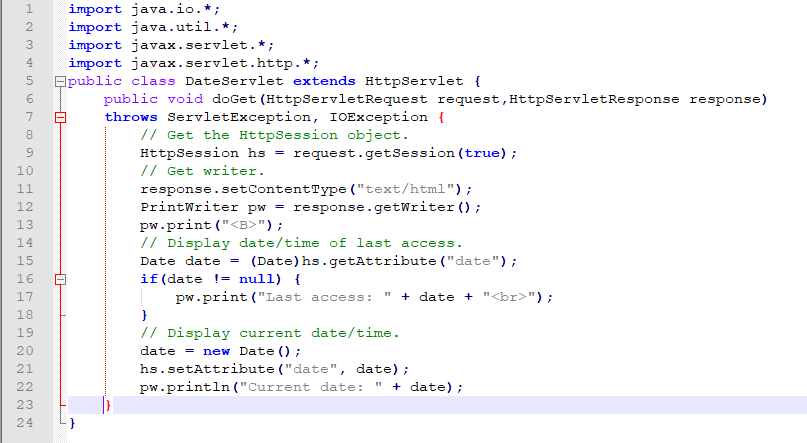
The following servlet illustrates how to use session state. The
getSession( )
method gets the current session. A new session is created if one does not
already exist. The
getAttribute( )
method is called to obtain the object that is bound to the name “date”. That
object is a
Date
object that encapsulates the date and time when this page was last accessed.
(Of course, there is no such binding when the page is first accessed.) A
Date
object encapsulating the current date and time is then created. The
setAttribute( )
method is called to bind the name “date” to this object.
When you first request this servlet, the browser displays one line with the
current date and time information. On subsequent invocations, two lines are
displayed. The first line shows the date and time when the servlet was last
accessed. The second line shows the current date and time.
Answer: The
ServletRequest
interface includes methods that allow you to read the names and values of
parameters that are included in a client request. We will develop a servlet
that illustrates their use. The example contains two files. A web page is
defined in
PostParameters.htm
, and a servlet is defined in
PostParametersServlet.java
.
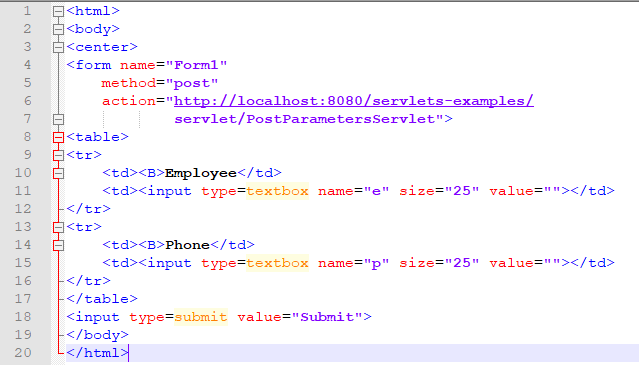
The HTMLsource code for
PostParameters.htm
is shown in the following listing. It defines a table that contains two
labels and two text fields. One of the labels is Employee and the other is
Phone. There is also a submit button. Notice that the action parameter of
the form tag specifies a URL. The URL identifies the servlet to process the
HTTP POST request.
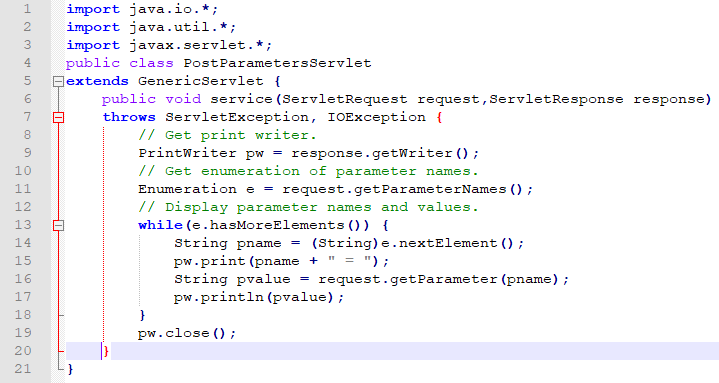
The source code for
PostParametersServlet.java
is shown in the following listing. The
service( )
method is overridden to process client requests. The
getParameterNames( )
method returns an enumeration of the parameter names. These are processed in
a loop. You can see that the parameter name and value are output to the
client. The parameter value is obtained via the
getParameter( )
method.
Compile the servlet. Next, copy it to the appropriate directory, and update
the
web.xml
file, as previously described. Then, perform these steps to test this
example:
1. Start Tomcat (if it is not already running).
2. Display the web page in a browser.
3. Enter an employee name and phone number in the text fields.
4. Submit the web page.
After following these steps, the browser will display a response that is
dynamically generated by the servlet.
Answer: Now, let’s develop a servlet that illustrates how to use cookies.
The servlet is invoked when a form on a web page is submitted.
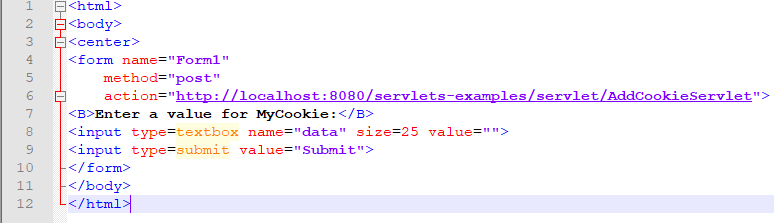
The HTML source code for
AddCookie.htm
is shown in the following listing. This page contains a text field in which
a value can be entered. There is also a submit button on the page. When this
button is pressed, the value in the text field is sent to
AddCookieServlet
via an HTTP POST request.
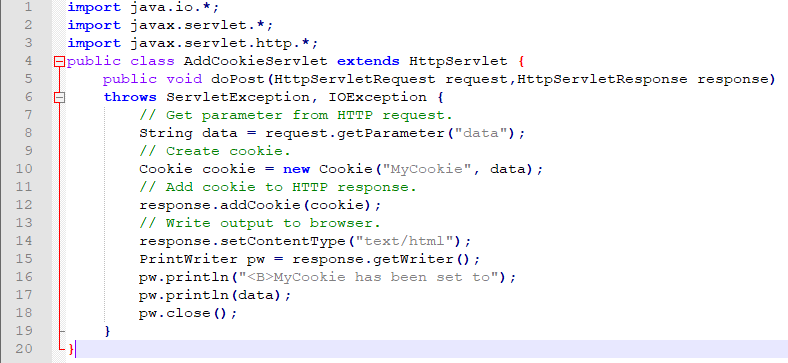
The source code for
AddCookieServlet.java
is shown in the following listing. It gets the value of the parameter named
“data”. It then creates a
Cookie
object that has the name “MyCookie” and contains the value of the “data”
parameter. The cookie is then added to the header of the HTTP response via
the
addCookie( )
method. A feedback message is then written to the browser.
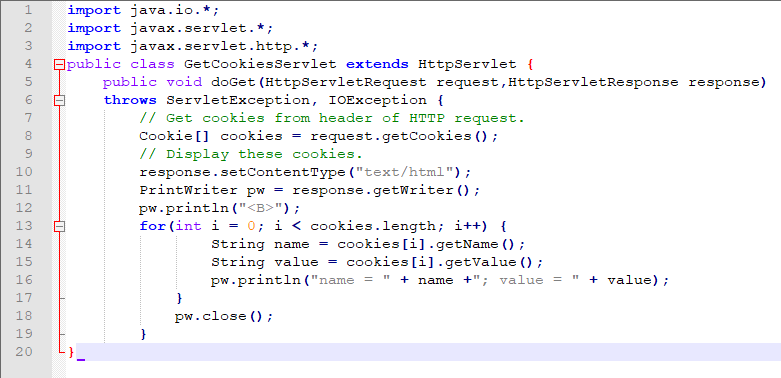
The source code for
GetCookiesServlet.java
is shown in the following listing. It invokes the
getCookies( )
method to read any cookies that are included in the HTTP GET request. The
names and values of these cookies are then written to the HTTP response.
Observe that the
getName( )
and
getValue( )
methods are called to obtain this information.
Compile the servlets. Next, copy them to the appropriate directory, and
update the
web.xml
file, as previously described. Then, perform these steps to test this
example:
1. Start Tomcat, if it is not already running.
2. Display
AddCookie.htm
in a browser.
3. Enter a value for
MyCookie
.
4. Submit the web page.
After completing these steps, you will observe that a feedback message is
displayed by the browser.
Next, request the following URL via the browser:
http://localhost:8080/servlets-examples/servlet/GetCookiesServlet
Observe that the name and value of the cookie are displayed in the browser.
Below Page NAVIGATION Links are Provided...
All the Questions on Question Bank Is SOLVED
Follow our Instagram Page:
FutureVisionBIE
https://www.instagram.com/futurevisionbie/
Message: I'm Unable to Reply to all your Emails
so, You can DM me on the Instagram Page & any other Queries.